I’ve been using CrashPlan as an online backup solution for quite some time, and it works really well.
I like the fact that I can subscribe to the consumer plan, with almost 3.5TB of data backed up, and that the backup client installs on a server OS. Many of the other “unlimited” backup providers I tested have restrictions in place that make such a setup impossible.
CrashPlan sends email notifications about backup status, and I noticed that something was wrong with the backup:

I logged onto the machine, opened the main UI, and after a few seconds the UI just closed. opened it again, same thing, after about 15s the UI closed.
My initial thoughts were that it is a crash, but on attaching a debugger, the exit call stack showed that the process was cleanly terminated after receiving a signal.
On looking at the NT eventlog I could see that the service was restarting about every 15s:
The CrashPlan Backup Service service entered the stopped state. The CrashPlan Backup Service service entered the running state. The CrashPlan Backup Service service entered the stopped state. The CrashPlan Backup Service service entered the running state. The CrashPlan Backup Service service entered the stopped state. The CrashPlan Backup Service service entered the running state.
The service wasn’t crashing, it was externally being stopped and restarted. I looked in the CrashPlan directory, and I found several log files with a naming like restart_1342296082496.log. The contents of these files looked like this:
Sat 07/14/2012 13:01:22.53 : "C:\Program Files\CrashPlan\bin\restart.bat" ECHO is off. Sat 07/14/2012 13:01:22.53 : APP_BASE_NAME=CrashPlan Sat 07/14/2012 13:01:22.53 : APP_DIR=C:\Program Files\CrashPlan ECHO is off. Sat 07/14/2012 13:01:22.53 : Stopping CrashPlanService The CrashPlan Backup Service service is stopping. The CrashPlan Backup Service service was stopped successfully. Sat 07/14/2012 13:01:25.05 : Sleeing 15 seconds... Pinging 127.0.0.1 with 32 bytes of data: Reply from 127.0.0.1: bytes=32 time<1ms TTL=128 Reply from 127.0.0.1: bytes=32 time<1ms TTL=128 Reply from 127.0.0.1: bytes=32 time<1ms TTL=128 Reply from 127.0.0.1: bytes=32 time<1ms TTL=128 Ping statistics for 127.0.0.1: Packets: Sent = 15, Received = 15, Lost = 0 (0% loss), Approximate round trip times in milli-seconds: Minimum = 0ms, Maximum = 0ms, Average = 0ms Sat 07/14/2012 13:01:39.08 : Starting CrashPlanService The CrashPlan Backup Service service was started successfully. ECHO is off. Sat 07/14/2012 13:01:39.13 : Exiting...
I looked for a newer version, but 3.2.1 was the latest version. I logged a support ticket with CrashPlan, but I continued my investigation. I found a log file service.log.0, several MB in size, and inside it I found this:
[07.14.12 12:32:39.480 ERROR QPub-BackupMgr backup42.service.backup.BackupController] OutOfMemoryError occurred...RESTARTING! message=OutOfMemoryError in BackupQueue!
So it seems that the service is running out of memory. I now had a few good keywords to search on, and I found this post of a user with the same problem. At about the same time I received a reply from CrashPlan support, not bad for weekend service, with the same solution.
The CrashPlan backup service and desktop applications are Java apps, and as such the maximum amount of memory they use is capped by configuration. I have had similar problems with other memory hungry Java apps, like Jaikoz, that simply fail unless you increase the memory limit.
To fix the problem, shut down the service, open the CrashPlanService.ini file in the program directory, and increase the maximum memory utilization parameter to 2GB, the default is 512MB, and restart the service:
Virtual Machine Parameters=-Xrs -Xms15M -Xmx2048M
After upping the memory all seemed well, and the service has been running for more than a day. But, I wanted to know just how much memory is CrashPlan using, and it turns out to be insane.
Here are the current stats for the amount of data I back up, as well as the resource utilization by the backup service and desktop app:
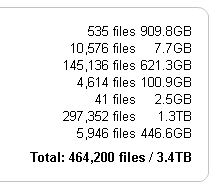
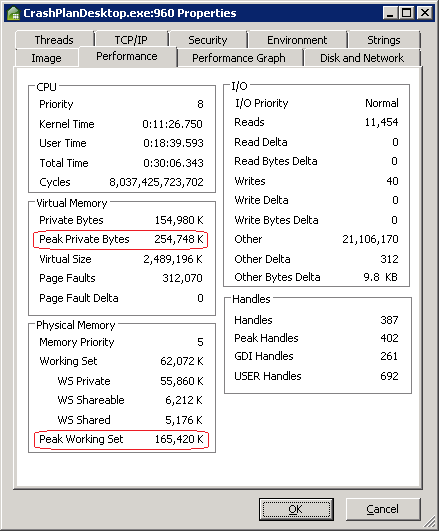
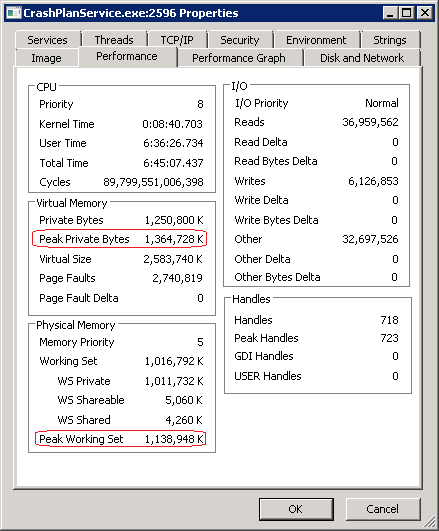
As you can see, the desktop app’s peak private bytes exceed 250MB, and the service exceeds 1.3GB, that’s right 1.3GB of memory!
Those numbers are simply outrageous.