In my last post I described how to prevent Windows from automatically restarting when encountering a BSOD during the OS install process. This allowed me to see the ACPI_BIOS_ERROR fault code while installing Windows 8 on my new SuperMicro workstation. The new Windows 8 BSOD page looks friendly, but no longer displays any error parameters other than the main fault code.
In order to get additional details of the crash, I had to hook up a kernel debugger to the machine. Windows 8 adds USB3 and TCPIP kernel debug support, and I will describe how I used the TCPIP network option to capture details of the crash.
First thing to do is prepare our tools, download the Windows 8 Debugging Tools for Windows package, and the Windows 8 Symbols.
Unfortunately the debugging tools are no longer available as a standalone download, and you need to install the SDK or WDK on a Windows 8 system in order to get them, but you can choose to only install the debugging tools. Once you have installed the debugging tools on one machine, you can copy the MSI installers or the directory to any other machines, including Windows 7 systems. You will find the tools in the “C:\Program Files (x86)\Windows Kits\8.0\Debuggers” folder.
Microsoft is pretty good at publishing symbols for most released versions of their products to their public symbol server, but I prefer to extract the symbols to a working directory on my machine, or to upload the symbols to our internal symbol server. You can install the downloaded symbols MSI package directly, or use the following command to extract the symbols from the MSI file to a location on disk. Run an elevated (right click run as administrator) command prompt, and type:
msiexec /a [symbol msi file name] /qb targetdir="[output directory]"
Next we need to enable kernel network debugging in the BCD options. This needs to be done on a Windows 8 machine as the network debugging command is not supported in older versions of BCDEdit. I should also call out that network debugging support is required for hardware logo certification, but not all current adapters support it. Insert the bootable Windows 8 USB key, run an elevated command prompt, and type:
bcdedit -store [usb key drive]:\boot\bcd /dbgsettings net hostip:[IP of WinDbg machine] port:50000
BCDEdit will output the connection security key that is required by WinDbg.
Start WinDbg, and enable network kernel debugging, entering the port number and security key.
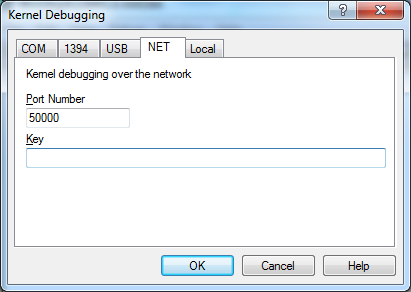
Boot the target machine, you will see the target machine connecting to WinDbg:
Microsoft (R) Windows Debugger Version 6.2.8400.0 AMD64 Copyright (c) Microsoft Corporation. All rights reserved. Using NET for debugging Opened WinSock 2.0 Waiting to reconnect... Connected to target 192.168.1.106 on port 50000 on local IP 192.168.1.100. Connected to Windows 8 8400 x64 target at (Fri Jul 20 11:07:21.583 2012 (UTC - 7:00)), ptr64 TRUE Kernel Debugger connection established.
And then the ACPI_BIOS_ERROR crash:
``25: kd> !analyze -v
*Bugcheck Analysis **
*******************************************************************************ACPI_BIOS_ERROR (a5)
The ACPI Bios in the system is not fully compliant with the ACPI specification.
The first value indicates where the incompatibility lies:
This bug check covers a great variety of ACPI problems. If a kernel debugger
is attached, use “!analyze -v”. This command will analyze the precise problem,
and display whatever information is most useful for debugging the specific
error.
Arguments:
Arg1: 0000000000000003, ACPI_FAILED_MUST_SUCCEED_METHOD
ACPI tried to run a control method while creating device extensions
to represent the ACPI namespace, but this control method failed.
Arg2: fffffa8019f2f288, The ACPI Object that was being run
Arg3: ffffffffc0000034, return value from the interpreter
Arg4: 00000000494e495f, Name of the control method (in ULONG format)Debugging Details:
——————ACPI_OBJECT: fffffa8019f2f288DEFAULT_BUCKET_ID: WIN8_DRIVER_FAULTBUGCHECK_STR: 0xA5PROCESS_NAME: SystemCURRENT_IRQL: 0LAST_CONTROL_TRANSFER: from fffff803ca1e617a to fffff803ca0e5870STACK_TEXT:
fffff880053eb418 fffff803ca1e617a : 0000000000000000 00000000000000a5 fffff880053eb580 fffff803ca16b930 : nt!DbgBreakPointWithStatus
fffff880053eb420 fffff803ca1e57d2 : 0000000000000003 00000000494e495f fffff803ca168810 00000000000000a5 : nt!KiBugCheckDebugBreak+0x12
fffff880053eb480 fffff803ca0eb044 : 00000000c0000034 fffff88001038255 fffffa801a50fe78 00000000c0000034 : nt!KeBugCheck2+0x79f
fffff880053ebba0 fffff88001043949 : 00000000000000a5 0000000000000003 fffffa8019f2f288 ffffffffc0000034 : nt!KeBugCheckEx+0x104
fffff880053ebbe0 fffff8800103bded : 0000000000000000 0000000000000000 0000000000008004 00000000c0000034 : ACPI!ACPIBuildCompleteMustSucceed+0x39
fffff880053ebc20 fffff880010346bd : fffffa801a500000 0000000000008000 0000000000000000 fffffa8037e80000 : ACPI!AsyncCallBack+0x7f
fffff880053ebc50 fffff88001034f56 : fffffa801a500000 fffff88001072be0 0000000000000000 0000000000000002 : ACPI!RunContext+0x141
fffff880053ebc90 fffff880010386e3 : fffffa8019b1c3a0 0000000000000000 0000000000000000 fffffa8019a35258 : ACPI!InsertReadyQueue+0xd6
fffff880053ebcc0 fffff8800103862a : fffff803ca2eb490 fffff88001072be0 0000000000000000 00000000546c6d41 : ACPI!RestartCtxtPassive+0x2f
fffff880053ebcf0 fffff803ca0cb181 : fffffa8019e06b00 0000000000000080 fffff88004ac6540 0000000000000000 : ACPI!ACPIWorkerThread+0xea
fffff880053ebd50 fffff803ca0dae26 : fffff88004aba180 fffffa8019e06b00 fffff88004ac6540 fffffa8019a8f940 : nt!PspSystemThreadStartup+0x59
fffff880053ebda0 0000000000000000 : fffff880053ec000 fffff880053e6000 0000000000000000 0000000000000000 : nt!KiStartSystemThread+0x16STACK_COMMAND: kbFOLLOWUP_IP:
ACPI!ACPIBuildCompleteMustSucceed+39
fffff880`01043949 cc int 3SYMBOL_STACK_INDEX: 4SYMBOL_NAME: ACPI!ACPIBuildCompleteMustSucceed+39FOLLOWUP_NAME: MachineOwnerMODULE_NAME: ACPIIMAGE_NAME: ACPI.sysDEBUG_FLR_IMAGE_TIMESTAMP: 4fe6a2b1BUCKET_ID_FUNC_OFFSET: 39FAILURE_BUCKET_ID: 0xA5_ACPI!ACPIBuildCompleteMustSucceedBUCKET_ID: 0xA5_ACPI!ACPIBuildCompleteMustSucceedFollowup: MachineOwner
``
Even with all the crash details, it still doesn’t really help me make progress, as it has been two days since I logged the support request with SuperMicro, and no response yet.